

When a usage warning interrupts a coding task, it helps to know what options your account offers. This article explains what to check before using a banked reset and why the terms shown in your account matter.
The original video is below. Read the updated notes before relying on the offer shown in the recording.

What Are Banked Resets?
A banked reset is a rate-limit reset granted to an eligible account. It is different from purchasing additional usage credits. Check the reset offer in your own account before using it.
Documentation reviewed September 6, 2026: OpenAI describes a June 11–24, 2026 referral promotion that granted eligible Plus and Pro users banked resets, usable for 30 days after grant. That historical promotion does not establish today’s eligibility or terms for every account. The current invitation dialog shows the applicable reward and expiry.
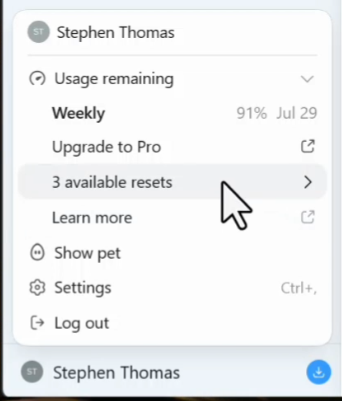
Before You Use a Reset
- Check which usage limit the offer resets.
- Check the expiry date shown in your account.
- Compare using it now with waiting for the normal reset.
Do not assume a reset refills every allowance across ChatGPT and Codex. OpenAI also documents purchased credits as a way for Plus and Pro users to continue after reaching limits.
Source: OpenAI usage and pricing documentation. The video shows the original demonstration; this update is a documentation review.
For practical examples to try next, see the AI learning path and VS Code agent skills tutorial.