
Copilot Code gives business teams a way to build internal apps by describing what they need. For developers, that means more work may start with an app that already has users. Someone still needs to handle errors, test the behavior, and check its data access.
Microsoft announced Home, Code, and Autopilot on September 25, 2026. Copilot Managed Runtime is the part I would start learning: the hosting and governance layer behind those team-built apps. This is an overview of the announcement and its developer implications, not a tested deployment walkthrough.

Home, Code, and Autopilot do different jobs
Microsoft is bringing three capabilities into Copilot:
- Home brings Chat and Cowork together, with Word, Excel, and PowerPoint editing inside Copilot.
- Code builds apps and other tools from natural-language requests. Microsoft says it uses the underlying technology behind GitHub Copilot in a sandbox.
- Autopilot is a persistent cloud agent for ongoing work. It can continue tasks and follow up over time within the boundaries you set.
My focus in the video is Code. An analyst or operations lead may have a problem that is too small to become a funded development project, but still needs an app. Once that app becomes useful, the team needs a way to keep it running.
Copilot Managed Runtime handles hosting and governance
Microsoft describes Copilot Managed Runtime as an IT-governed platform inside the Microsoft 365 tenant boundary. Apps built through Cowork, Code, Copilot Studio, and compatible third-party tools can use a common hosting and management model.
The host brings together Microsoft-operated hosting, Entra identity, governed data connections, and lifecycle controls. Administrators get an Apps inventory in the Microsoft 365 admin center for reviewing access, usage, health, and policy.
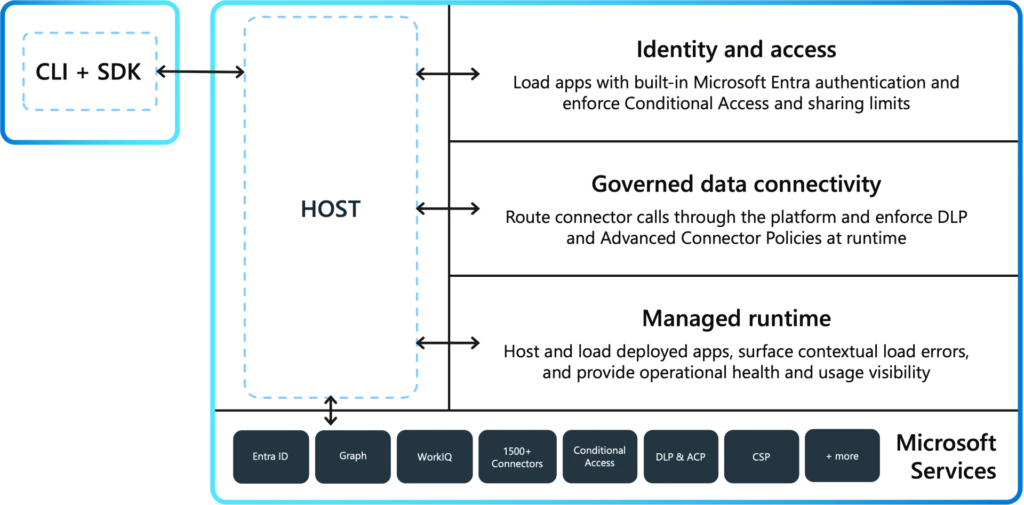
When a business team asks for help, the developer can review hosting, identity, and data access within the same operating model.
The developer handoff starts with working software
Microsoft says developers can continue extending a team-built app with familiar web technologies without creating a separate runtime. The SDK and CLI support project setup, typed connector services for TypeScript, local development, deployment, and versioning. The code remains editable and Git-backed.
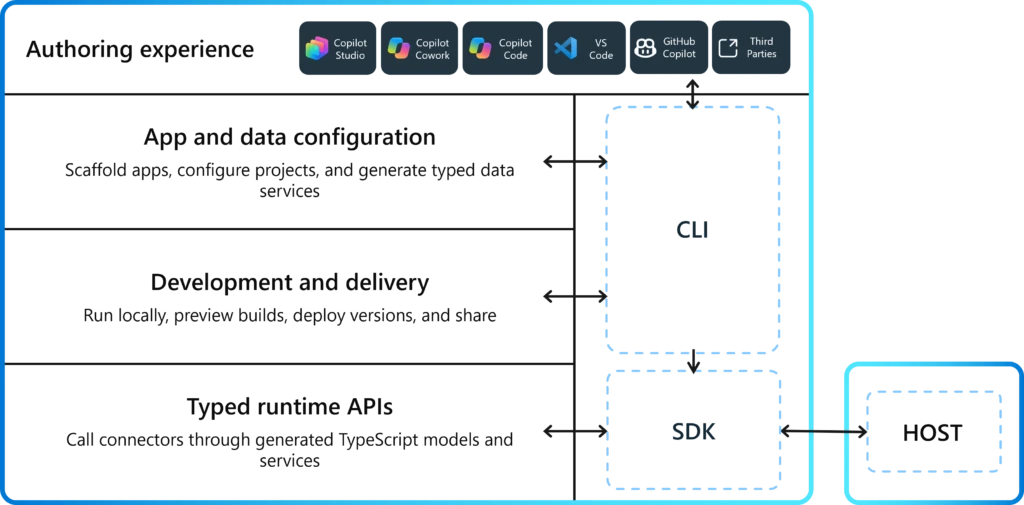
Today, an internal-tool request often starts with a ticket. With Copilot Code, you may inherit an app that a department already depends on. Your first job is to understand what it does and where it fails before adding more features.
For example, imagine a team-built tracker that works for its creator but fails when a colleague opens it. The screen may look finished while the data permissions still need work. Or a failed request may leave the user unsure whether a change was saved. Those are the kinds of problems I mean by hardening an app: tests, error handling, and data access that the original prompt may not have covered.
My take is that developers who learn Managed Runtime early will be well placed to help when these apps outgrow their original builders. Microsoft still positions GitHub Copilot as the tool for developers’ day-to-day coding.
Preview status and spending need separate checks
As of the September 25 announcement, the Managed Runtime host and SDK are in public preview. Microsoft says Code reaches Frontier at the end of September, while Autopilot expands to private preview. Check access in your own tenant before planning a trial.
Microsoft also places Cowork, Code, and Autopilot under usage-based billing. Do not assume an existing subscription covers every agentic task. Agree on who owns the trial’s spending before putting a business team on it.
Start with one small internal tool
Pick a small tool whose behavior you can check, then try deploying it to the Managed Runtime preview if your tenant has access. Keep the first exercise narrow enough to follow the full path from app creation to developer changes and ongoing operation.
Before calling the exercise complete, record who maintains the app, which data it reads or changes, what happens when an operation fails, and how you will test the next version. Those answers will make the next developer handoff easier.
For more Microsoft-focused developer material, follow my AI agents and MCP learning path.
References
- Microsoft: Introducing the new Copilot with Home, Code and Autopilot — September 25, 2026 announcement, rollout plans, and billing model.
- Microsoft: Copilot Managed Runtime host and SDK — public preview, developer handoff, governance, and original diagrams.