

HydraFusion lets GitHub Copilot CLI choose how to solve a task across models. Select it from the model list, submit your prompt, and it chooses a Single, Cascade, or Critique workflow. The goal is better output for the cost, with less manual model selection.
In my demo, I enable the preview and try both a trivial request and a more involved prompt. This guide covers the setup, what the workflow labels mean, and how to interpret the results without treating benchmark savings as a promise.
Download the short powerpoint presentation that goes along with the video: HydraFusion Overview

What is HydraFusion?
HydraFusion is a research preview that puts model selection and orchestration behind one choice in GitHub Copilot CLI. You describe the problem; HydraFusion picks an execution approach for that request. As a developer, you can focus on the task instead of manually deciding which model should answer and which should review it.

Single, Cascade, and Critique explained
The three workflow names tell you which approach HydraFusion selected:
- Single: One model handles the task directly. In my demo, this was the path for a basic arithmetic prompt.
- Cascade: An efficient model drafts a solution. A quality gate then accepts that candidate or escalates to a stronger model.
- Critique: One model drafts the answer, a read-only critic from a different model family reviews it, and the drafting model revises once. GitHub relates this to its Rubber Duck review pattern.
These are alternative execution paths. You do not manually run all three for each prompt. The official HydraFusion announcement explains the routing and review behavior.
Enable HydraFusion in GitHub Copilot CLI
Start with GitHub Copilot CLI installed and signed in. In the video, I already have it running on a virtual machine. If you need that initial setup, use my beginner’s guide to GitHub Copilot CLI.
Enter these commands inside the Copilot CLI session, one at a time:
- Update the CLI. Run
/updateand complete the update. - Enable experimental features. Run
/experimental on. In my demo, enabling this restarted the CLI. - Open the model picker. Run
/model, then select the HydraFusion preview entry.
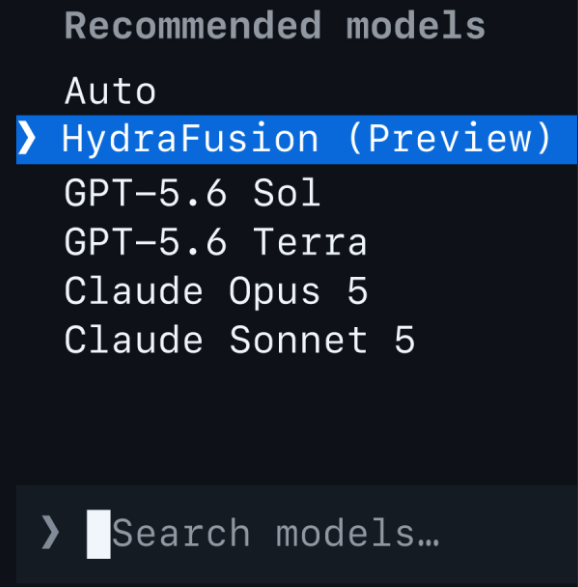
The model picker in my recording labels it HydraFusion (Preview); GitHub’s instructions use HydraFusion (Research Preview). After selecting it, check the active model indicator before submitting a request. If the option is missing, first check that the update completed and experimental mode is enabled. Preview labels and availability can change.
What happened in my demo?
I started with add two plus two. HydraFusion reported Single and returned the answer. This was a quick check that the option was active, rather than a meaningful quality test.
I then submitted a more complex prompt. HydraFusion chose Cascade and showed its progress while the work ran. The supplied screenshot captures main and review passes plus a conditional fix-up stage.
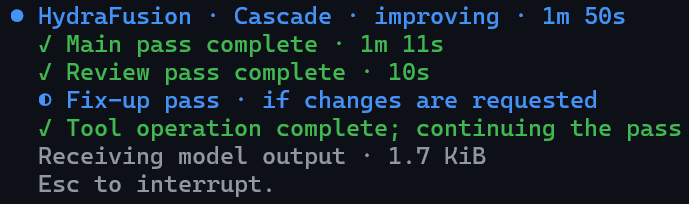
The full run took roughly three to four minutes and showed 25 credits in my recording. It completed the request and gave me the output I had asked for. Those figures describe that one run; the screenshot’s timer is an intermediate progress snapshot. The exact longer prompt is not reproduced in this guide, so this is an observation from the video, not a repeatable benchmark.
How to interpret the cost and quality claims
GitHub reports a 67% reduction in estimated workflow cost and a 4.9-point quality improvement versus Opus 5 on TerminalBench 2.1. These are controlled offline evaluation results, specific to the tested configuration. See the benchmark results and methodology for the comparison.
That is a reason to evaluate HydraFusion, not a prediction for your next request. My short demo did not compare the same task across multiple models. To decide whether the approach helps you, compare the result, time, and usage on work you actually need to complete.
Start with a well-scoped task
The preview’s recommended starting point is a substantial coding task described in a single prompt. GitHub identifies longer, iterative sessions as an area for further improvement. That makes a clear first request a better starting test than an extended back-and-forth conversation.
My main takeaway is the value of orchestration: the workflow can contribute to the result alongside the capability of an individual model. Give HydraFusion a task you can assess, inspect what it returns, and judge whether the combination of quality, time, and cost works for you.