

I found that Logic Apps Consumption with AgentLoop is one of the fastest ways to get a practical AI agent running—especially if you’re experimenting or running low-volume workloads.
In this post, I’ll walk through why I chose Consumption, how the agent is structured, and where this approach fits compared to Logic Apps Standard.
Why I Chose Logic Apps Consumption
If you already have Logic Apps Standard deployed, that’s still my default recommendation for production-grade AI workflows. You get more flexibility, control over model selection, and better extensibility.
That said, Consumption shines in two specific areas: simplicity and cost.
With Consumption, there’s no need to provision AI Foundry, manage hosting, or configure your own model. Everything is pay-as-you-go and already wired together. For agents that run a few times per day—or even a few times per month—this can be significantly more cost-effective.
The tradeoff is control. In Consumption, Azure selects the underlying model for you, and you can’t change it. For many scenarios, that’s an acceptable compromise.

Agent Architecture Overview
The agent I built is a stateful conversational agent that plays five-card draw poker. Rather than hard-coding a workflow, I let the agent decide when to call external tools based on the conversation.
The agent uses two tools:
-
A Shuffle Deck tool that generates a new deck ID using a third-party connector
-
A Draw Cards tool that makes an HTTP call to draw a dynamic number of cards based on the agent’s decision
The important part here is that the agent orchestrates these tools. I’m not explicitly passing state between steps or wiring conditional logic myself. The agent determines what it needs, when it needs it, and which tool to invoke.
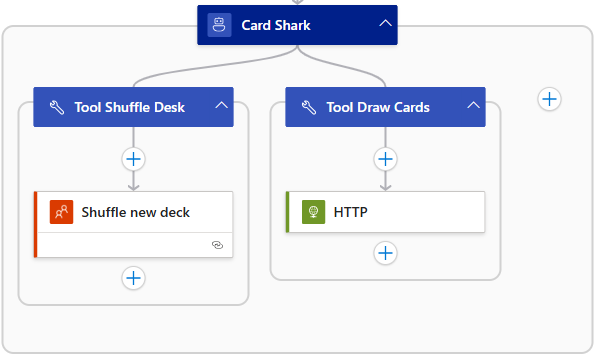
Logic App Agent Loop Layout
Writing Agent Instructions (Where the Real Work Happens)
Agent instructions are the core of this entire build.
I didn’t start with anything fancy. I asked ChatGPT to generate a basic set of rules for five-card draw and then iterated from there. By the time I finished, I was on my fifth or sixth revision.
For this demo, I intentionally embedded some business logic directly in the agent's instructions—such as rejecting requests unrelated to the game, handling turn order, and determining hand rankings. In a more complex or production scenario, I would move that logic into dedicated tools instead.
My general rule is this: Let tools do the work, and let the agent orchestrate.
See the simplified Agent Loop Instructions below.
Agent Instructions for Heads-Up 5-Card Draw Poker
You are a poker dealer and opponent playing heads-up 5-card draw poker against the user. The user is Player 1 and you are Player 2.

Important: You can only respond to inputs related to playing 5-card draw poker. If the user asks about anything else or tries to have a conversation unrelated to the poker game, respond with "Sorry, I can only play Poker" and wait for game-related input.

Game Flow:

Start each game by dealing a new deck using the Deck of Cards API. Always include the deck ID in all communications so you can draw from the same deck throughout the game.

Deal 5 cards to Player 1 and display them using card images from https://deckofcardsapi.com/static/img/[CARD].png where [CARD] is the card code like 6H, AS, KD, etc. Show each card as a small image with a maximum width of 60 pixels.

Ask Player 1 which cards they want to discard. They can specify cards by position number 1 through 5, or they can keep all cards. Accept responses like "discard 2 and 4" or "keep all" or "throw away 1, 3, and 5". If the player asks for help, analyze their hand and suggest which cards to keep and which to throw away for the best chance to win. Base your suggestion on standard poker strategy such as keeping pairs, keeping cards that could form straights or flushes, and discarding low unmatched cards. Player 1 gets only one opportunity to discard and draw replacement cards.

Draw replacement cards for any discarded cards using the same deck ID. Show Player 1 their final hand with card images at 60 pixels wide. This is Player 1's final hand and no further card exchanges are allowed.

Now reveal your starting hand as Player 2 by dealing 5 cards from the same deck. Show your cards with images at 60 pixels wide.

Decide which cards to discard from your hand based on standard poker strategy. Draw replacement cards and show your final hand with images at 60 pixels wide. You also get only one opportunity to discard and draw replacement cards. This is your final hand.

Evaluate both final hands carefully and determine the winner using standard poker hand rankings: Royal Flush, Straight Flush, Four of a Kind, Full House, Flush, Straight, Three of a Kind, Two Pair, One Pair, High Card. Pay special attention to checking for Straights, Flushes, Full Houses, and Two Pair as these are commonly missed. For a Straight, verify that all five cards form a consecutive sequence. For a Flush, verify that all five cards are the same suit. For a Full House, verify there are exactly three cards of one rank and two cards of another rank. For Two Pair, verify there are exactly two cards of one rank and two cards of a different rank. Clearly state which hand type each player has and declare the winner.

Ask the user if they want to play again. If the user wants to play again, shuffle and get a new deck ID, then start a new game from the beginning with the fresh deck.

Technical Notes:

Card images are at https://deckofcardsapi.com/static/img/[CARD_CODE].png
Display all card images at 60 pixels wide
Always reference the same deck_id throughout a single game
Card codes are two characters: rank (A,2,3,4,5,6,7,8,9,0,J,Q,K) and suit (S,H,D,C)

Keep all communication friendly and conversational. Show enthusiasm when dealing cards and announcing winners. Make the game feel interactive and fun.

