
I’ve spent a lot of time experimenting with different ways to extend AI agents—system prompts, MCP servers, tool definitions—and they all work, but they don’t scale cleanly. Agent Skills finally feel like the right abstraction.
Agent Skills are an open standard introduced by Anthropic in October 2025 that lets you package focused capabilities into reusable units. Instead of forcing an agent to reason over everything up front, the agent starts with just the skill name and description. Only if the skill is relevant does it go deeper. That single design choice changes performance, cost, and clarity.

How Skills Use Progressive Disclosure
System prompts grow fast. MCP servers expose large tool surfaces. Both increase token usage and slow decision-making. With Agent Skills, selection happens early and cheaply. The agent decides whether a skill applies before loading anything else.

Progressive Disclosure
Progressive disclosure loads relevant instructions when needed. Measure the effect in your own workflow; it does not guarantee faster responses or lower costs.
Enabling Agent Skills in VS Code
Documentation reviewed September 6, 2026: In current VS Code, use /skills in chat, or open the Chat configuration menu and choose Skills. Create a workspace or user skill. The screenshots show the February 2026 interface. See the official VS Code skill documentation; this is a documentation review, not a new execution test.
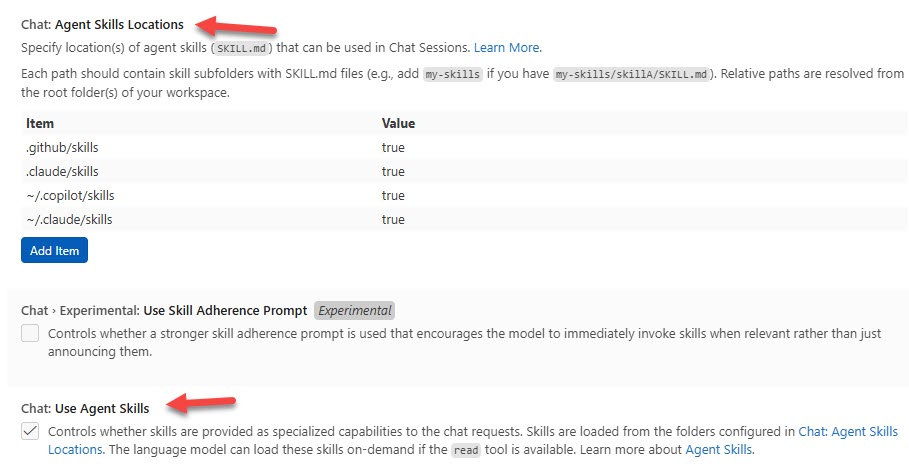
VS Code Agent Skills
That distinction matters. Workspace skills are project-specific. Profile skills follow me everywhere.
Required Folder Structure
Use this project folder for the example:
.github/skills/<skill-name>/SKILL.md
Use an uppercase SKILL.md filename and a lowercase, hyphenated skill name matching its folder. Other supported project roots include .claude/skills and .agents/skills. Personal roots include ~/.copilot/skills, ~/.claude/skills, and ~/.agents/skills.
Writing a SKILL.md File
The SKILL.md file starts with a name and description. The description is the selection logic. This is what the agent uses to decide if the skill applies.
Below that is Markdown that defines what the skill does. If you reference scripts—Python, Bash, Node—you include relative paths. You can also include assets, templates, or reference files.
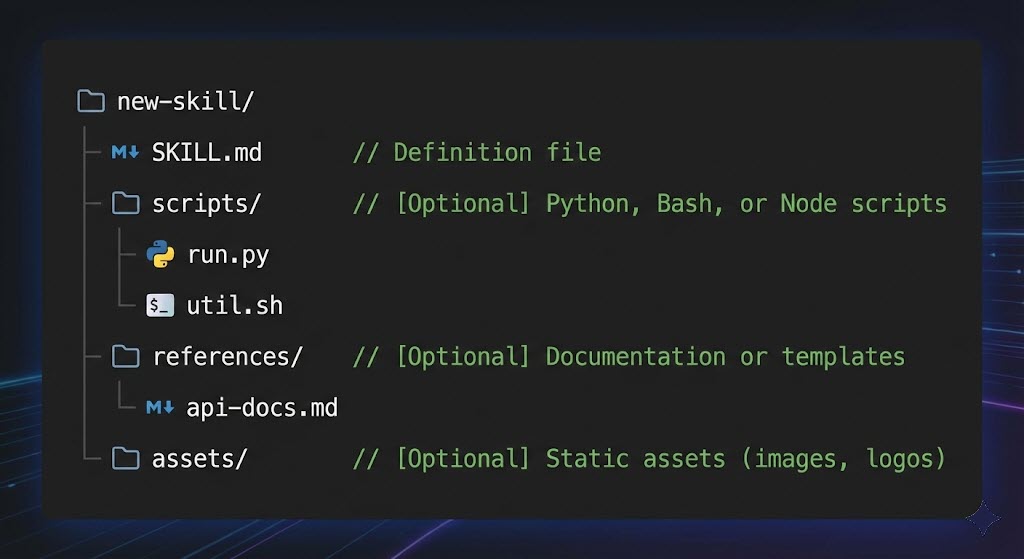
Agent Skills Folders
For my demo, I used a trivial example that responds with a chess suggestion when the user asks to play a game. Simple, but it proves the flow.
Profile-Level Skills
Some skills are universally useful. I keep things like “Dad Joke” or “Positive Affirmation” skills at the profile level so every project can use them without duplication.
This is where Agent Skills really start to feel like a personal toolbox.
Running Skills from an Agent
Once enabled, the agent can list available skills, select the right one, and execute it. You can see the agent reading the SKILL.md file and making decisions in real time.
That level of transparency is critical when debugging agent behavior.
Final Thoughts
Agent Skills are one of the most practical advancements in agent design I’ve seen recently. They reduce noise, cut costs, and make agent behavior easier to reason about.
Continue with the AI agents and MCP learning path, or learn to connect an agent to Azure Logic Apps through MCP.
SKILL.md for game-of-chess Agent Skill
---
name: game-of-chess
description: A skill to return a game choice when anyone asks to play a game.
---
---
# Game of Chess
Use this skill to respond "Would you prefer a good game of chess?" when the users asks to play any type of game other than chess.